

Works with any Skills-compatible agent. The examples below use Claude Code, but the skill installs on any agent that supports the Skills CLI.
Install
Three commands. No environment setup.Why This Exists
Dashboards are great for monitoring. They’re terrible for fixing. When something breaks in your AI product, the workflow usually looks like: notice a dip in a chart → click around for 10 minutes → find a bad conversation → figure out what went wrong → switch to your editor → find the code → make the change. That’s 30 minutes of context switching for a 2-minute fix. The Greenflash skill collapses that loop. You ask a question in natural language, the skill queries your real conversation data, and you get an answer with evidence — often with a code fix you can apply immediately.What You Can Do
The skill routes your question to the right workflow automatically. You don’t need to memorize commands — just describe what you want.Check product health
Diagnose what’s broken
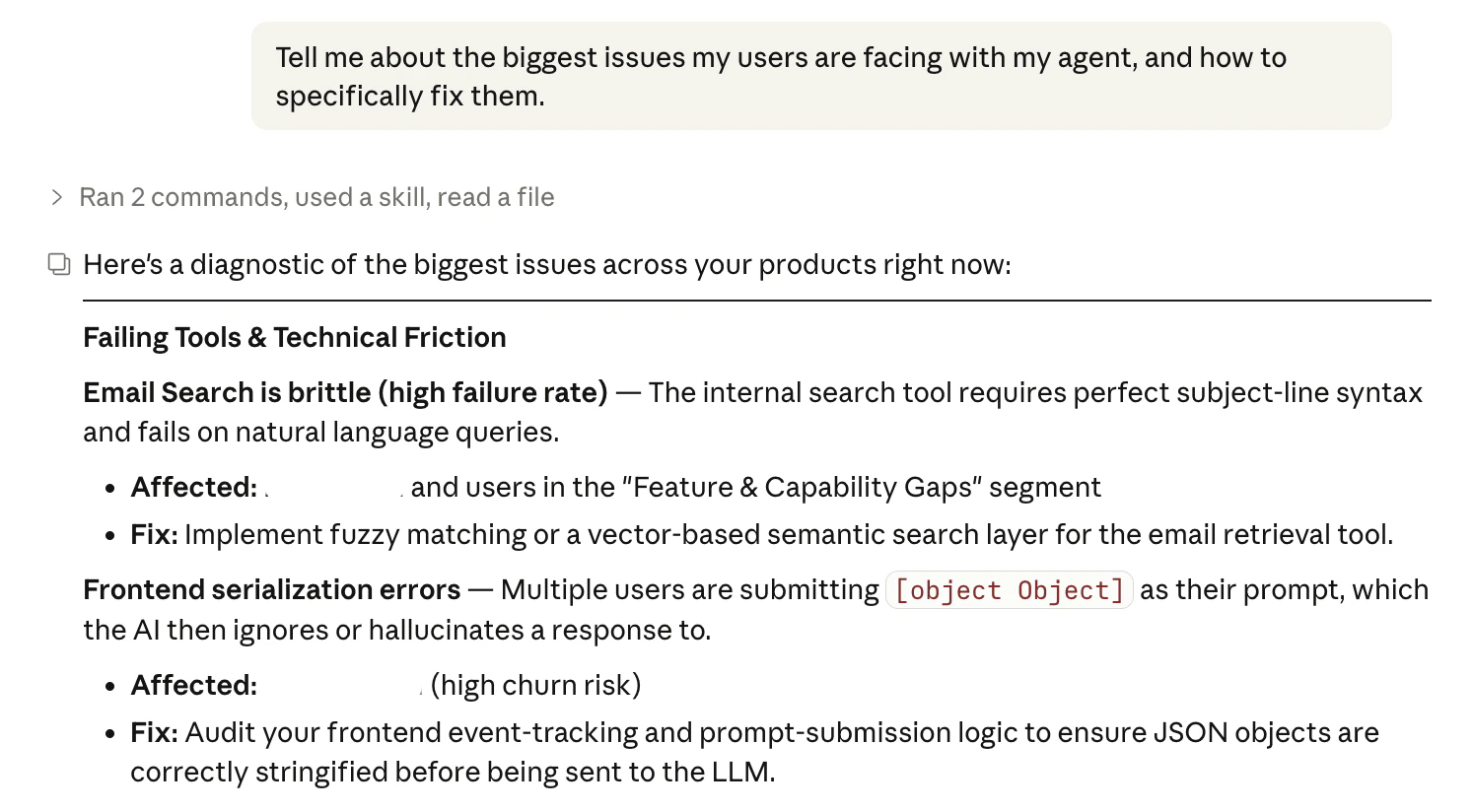
Optimize prompts and models
Find struggling users
Triage your inbox
Set up the SDK
Common Workflows
”Something broke and I need to fix it now”
// greenflash:diagnose comment at the fix site so future developers know the change was data-driven.
”My VP wants a status update”
”I just deployed a new prompt and want to know if it’s better”
”I want to understand a specific user’s experience”
”Set up Greenflash in a new project”
/greenflash-onboard-prompts), business events (/greenflash-onboard-events), and agentic message types (/greenflash-onboard-agentic).
How It Works
- You ask a question in natural language — or invoke a specific sub-skill directly.
- The router classifies your intent and delegates to the right workflow (health, inbox, users, prompts, diagnostics, or onboarding).
- The skill calls the Greenflash Chat API, which runs a multi-step investigation using your real conversation data.
- Results stream back with progress indicators, then a final answer with evidence.
- Follow-ups reuse the same conversation, so you can drill deeper without re-explaining context.
- When a fix is identified, the skill can search your codebase and apply the change directly — with your confirmation.
All Skills
Analytics & Diagnostics
| Skill | What it does |
|---|---|
greenflash | Entry point — classifies your question and routes to the right workflow |
greenflash-health | Quality trends, anomalies, safety issues, and sentiment across products |
greenflash-inbox | Triage flagged conversations, prioritized by severity |
greenflash-users | User behavior, segments, cohorts, and individual lookups |
greenflash-prompts | Prompt and model quality, optimization recommendations, and direct fixes |
greenflash-diagnose | Root cause analysis for failing tools, friction patterns, and guardrail violations |
SDK Integration
| Skill | What it does |
|---|---|
greenflash-onboard-unified | One-command setup — auto-detects your codebase and walks through everything |
greenflash-onboard | Core SDK integration (Python & TypeScript) |
greenflash-onboard-prompts | System prompt logging for versioning and optimization |
greenflash-onboard-agentic | Tool calls, reasoning traces, and agent workflow logging |
greenflash-onboard-events | Business event tracking — link conversations to outcomes |
greenflash-verify | Verify your integration is working: API key, SDK, client, and data flow |
Configuration
The skill resolves your API key in this order:$GREENFLASH_API_KEYenvironment variable.greenflashfile in the project root- Interactive prompt (key is saved to
.greenflashfor future runs)
.greenflash file is automatically added to .gitignore to prevent accidental commits.
Analytics and Chat endpoints require a Growth plan or higher. Data and lookup endpoints work on all plans. Upgrade here if needed.
Next Steps
GitHub Repository
Source code, issues, and contribution guide.
Public API
Access Greenflash data programmatically.
SDK Quickstart
Get your first insight in under 5 minutes.
Custom Analyses
Turn business questions into always-on checks.